List of notebooks
Summary of notebooks used in CCTV projects.
11/21/2023
- CCTV Defect Classification
Following files are found in the gqc-utility-notebooks repo / nbs folder:
01_CCTV Usage
- 01-usage-Create-cctv-settings-yaml.ipynb: Guide on how to create the
cctv_settings.ymlfile - 02-usage-running_cctv_image_processing_pipeline.ipynb: General guide on how to run each of the pipeline stages
- 03-usage-data_migration_utilities.ipynb: Guide on using data migration utilities
02_CCTV
- cctv-cli.ipynb: Terminal click modules
- cctv-Convert-png-to-jpg-sitting-in-zip-files.ipynb: Utility to convert png files to jpgs which reside in zip files
- cctv_convert_videos_using_ffmpeg.ipynb: Utility to convert videos
- cctv-data_migration_utilities.ipynb: Functions to migrate data from old datasets to new organization
- cctv-db-connection.ipynb: DB access functions
- cctv-distance-value-post-processing.ipynb: Filtering the distance values by removing outliers and interpolation
- cctv-extract-condition_codes.ipynb: Extract condition codes from the annotations text detected through OCR
- cctv-extract-distance-values.ipynb: Extract distance values from the annotations text detected through OCR
- cctv_extract_mid_frames_from_video_using_ffmpeg.ipynb: Extract middle frames from a video using ffmpeg
- cctv-frame-extraction.ipynb: Extract every n'th frame from videos
- cctv-full-frame-stitch-and-Azure-OCR.ipynb: Run Azure OCR after stitching full-frames
- cctv-GQC Logging.ipynb: Logging module used to log runs into logs/ directory
- cctv-import_supplementary_data.ipynb: Utility used to import data like 'condition_data' which reside on csv files into video db
- cctv-prepare-cctv-training-csv.ipynb: Split training/test data into respective csv files according to the criteria we select, 'FB', 'VB' etc.
- cctv-save-blurred-frames.ipynb: Blur the text fields of extracted frames
- cctv_SD1_label_images.ipynb: Postprocess the OCR detected labels to combine information from metadata and some rule-based processing which I have not checked into. Created by Vannary and modified by Srujana to work with DBs.
- cctv-utils.ipynb: General utility functions shared by other notebooks.
- cctv-video_list-creator.ipynb: Video list creation
- metadata_DB_extract_inspection_condition_data.ipynb: Extract the required data from utility provided metadata DBs.
- mid_frame_extractor_from_videos.ipynb: Extract mid frames using opencv.
- OLD-cctv-Azure-OCR.ipynb: Old method of Azure OCR where we sent out requests per frame
- OLD-cctv-distance-snip-and-label.ipynb: Old version of distance detection by restricting the distance search to the defined region in distance-bounding-box from the OCR results
- OLD-cctv-extract-defect_labels-and-distance-values.ipynb: Old version of extracting defect labels and distances at the same time
- old-cctv-extract-labels.ipynb: Old version of label extraction
- OLD-cctv-video-zip-and-video_list-creator.ipynb: Old version of video list csv creation and zip creation
- OLD-colab-cctv-snip-stitch-and-Azure-OCR-for-distance.ipynb: Older version of Azure OCR where the distance area is snipped before sending out to Azure OCR
- OLD_DNV_SD1_COV_create_image_labels_v2_access_database_updated_version.ipynb
- yaml.ipynb: Old version of image-label creation notebook described above.
- CCTV Defect Location Prediction
These are also located in the same repo directory as above.
04_CCTV GIS + Prediction
- 01_GIS+Prediction_DNV_mapping_defects_version_2.ipynb: Combine the correct material, defect, and other metadata from metadata DBs and shape files to prepare: 1. CSVs, 2. shape files ( I need to dive into the details to understand what's going on fully)
- 02_GIS+Prediction_prepare_data_for_defect_prediction_version_2.ipynb: Combines the data from shapefiles and metadata and creates a 'row per pipe' csv with all features to be used in training.
- 03_GIS+Prediction_lightGBM.ipynb: Old notebook for lightGBM, This trains and evaluates lightGBM and writes the predictions to shape files
- 03_RandomForest_xgb_lgbm_catboost.ipynb: Latest nb which identifies the optimal parameters for the prediction model by grid search on random-forest, xgboost, lightGBM. and CatBoost
- 04_GIS+Prediction_compile_results_CCTV_prediction_model.ipynb: Generate ROC AUC curves
- 05_GIS+Predictions_generate_shap_plot.ipynb: Shap plots for identifying important features
- 06_GIS+Predictions_save_the_predictions_to_shape_files.ipynb: Train a model with the selected optimal parameters (one time), save the model, load the model to run on a test set and write the result to shape file.
- WWTP Hybrid Modeling
- Collimator to TDEngine.ipynb (in colab) Google Colab: Pushes simulation data from collimator and Matlab to TDEngine and for visualizing through Grafana.
Feel free to adjust the formatting to suit your specific needs in your Markdown file.
11/06/2023
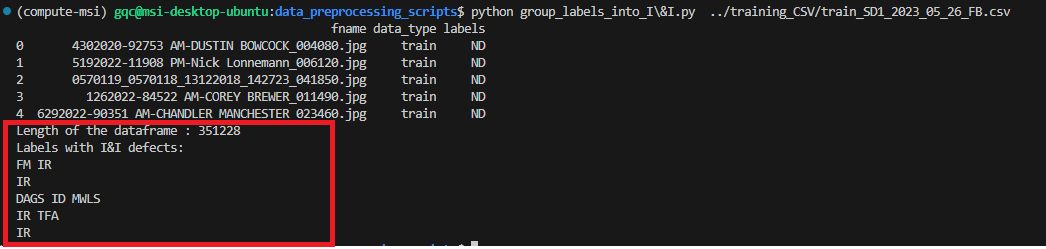
- Note for Sudhir: Ask from SD1, why there aren't 'I&I' defects available in the SD1_D dataset. For SD1_D dataset out of the 351228 datapoints only 5 are positive for 'I&I':